
Client Goal:
Automatically process every bill payment recorded in QuickBooks Online, confirm the payment details, and keep monday.com in sync — creating a new subitem for payments that don’t have one yet, and updating the existing subitem for payments that do — with no manual data entry.
🔑 The Problem
Art Roofing’s team was reconciling QuickBooks bill payments against project tracking in monday.com by hand. That meant:
- Payments could be posted in QuickBooks without ever showing up against the right job in monday.com
- The same payment could get logged twice if no one checked for an existing subitem first
- Amounts and transaction dates had to be manually copied and reformatted between systems
⚙️ The Automated Workflow
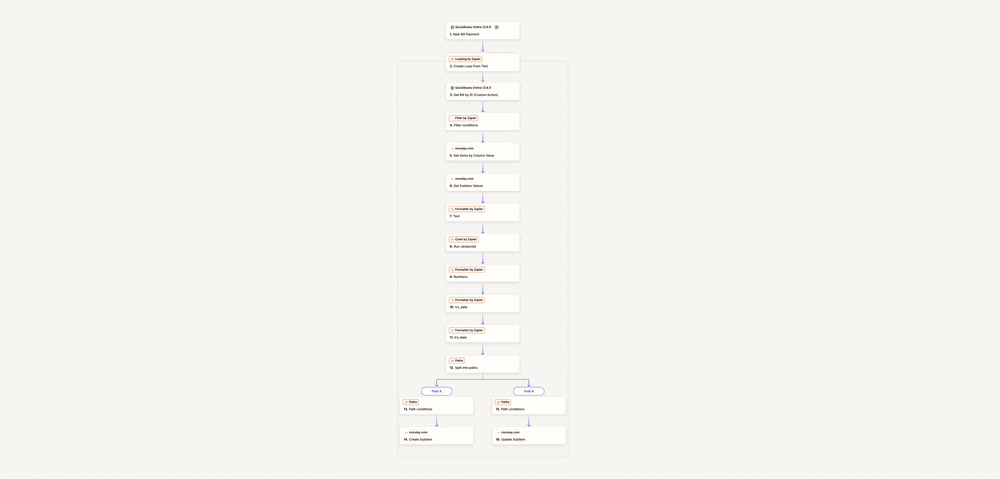
This Zap triggers on every new bill payment in QuickBooks Online and works line by line to keep monday.com accurate:
- Trigger:
New Bill Payment is recorded in QuickBooks Online. - Looping by Zapier:
Splits the payment into its individual applied-bill lines — since one payment can cover several bills at once — and runs the rest of the Zap once per line. - QuickBooks Online – Get Bill by ID:
Pulls the full bill record for each line, including detail the trigger doesn’t provide on its own. - Filter by Zapier:
Stops the Zap for any line that doesn’t meet the criteria needed to sync, so incomplete records never create junk downstream. - monday.com – Get Items by Column Value:
Looks up the matching project item on the board using the bill’s reference number. - monday.com – Get Subitem Values:
Pulls the existing subitems under that item to check whether this specific payment has already been logged. - Formatter by Zapier (Text):
Cleans up text fields so the comparison in the next step is reliable. - Code by Zapier (Run JavaScript):
Compares the QuickBooks payment against the subitems monday.com returned to determine whether a matching subitem already exists. - Formatter by Zapier (Numbers):
Formats the payment amount into the numeric format monday.com’s column expects. - Formatter by Zapier (trx_date) ×2:
Formats the transaction date for monday.com — once for each date field the board tracks. - Paths – Split into paths:
Branches the Zap based on whether the JavaScript step found a matching subitem.- ✅ No match found:
Path conditions confirm it, then monday.com – Create Subitem adds a new subitem with the payment amount, date, and reference. - 📝 Match found:
Path conditions confirm it, then monday.com – Update Subitem updates the existing subitem in place instead of creating a duplicate.
- ✅ No match found:
🔄 Flow Snapshot
- Loops through every line of a bill payment, not just the first
- Checks monday.com before writing anything, so nothing gets duplicated
- Branches automatically into create-vs-update paths
- Normalizes amounts and dates before they ever reach monday.com
📈 Results & ROI
- Faster reconciliation: Bill payments reach monday.com the same day they’re recorded in QuickBooks, with no manual matching
- No more duplicates: Subitems are checked before they’re created, eliminating double-logged payments
- Less manual entry: Amounts and dates no longer need to be re-typed between systems
- Cleaner job tracking: Every job in monday.com reflects an accurate, current payment status without anyone checking two systems
🧰 Tools Used
- QuickBooks Online
- Monday.com (Items + Subitems)
- Zapier Paths + Filter + Looping
- Formatter by Zapier
- Code by Zapier (JavaScript)
✅ Outcome
This automation closes the loop between accounting and project tracking for Art Roofing — every bill payment in QuickBooks Online is reflected in monday.com automatically, matched to the right job, and never duplicated.


Leave a comment