
Overview
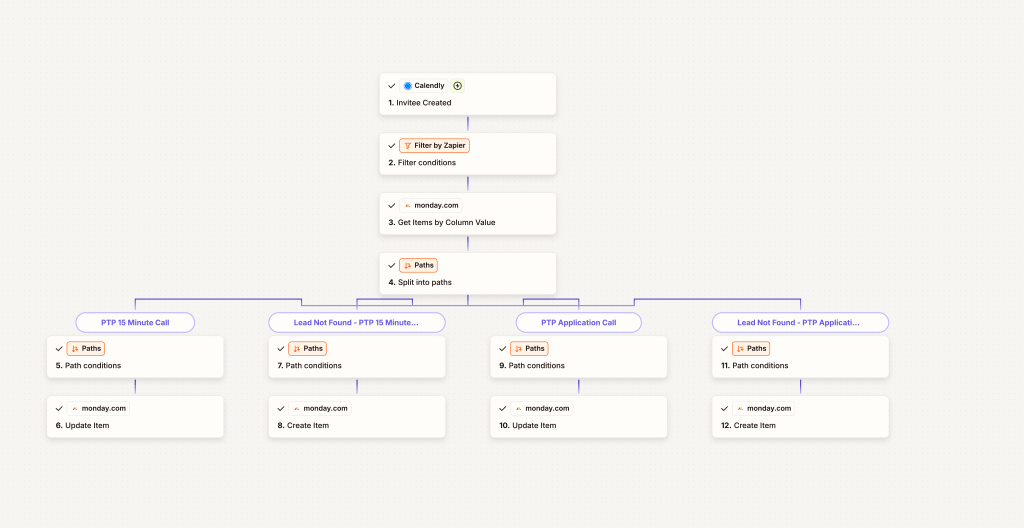
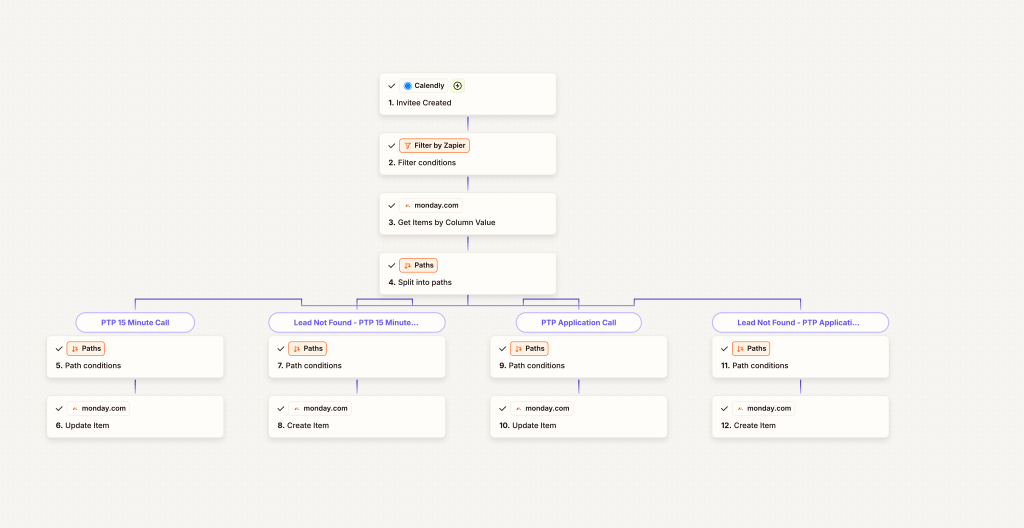
Managing client scheduling can quickly become chaotic without a reliable system in place. This Zapier automation ensures that every new Calendly booking flows directly into our system without the need for manual entry. The automation checks whether a contact already exists and either updates their information or creates a new entry seamlessly.
Goals
- Eliminate manual data entry when a new client books a meeting.
- Ensure accurate, up-to-date client records in our system.
- Improve scheduling efficiency and client onboarding.
Workflow / Design
- Trigger: A new invitee schedules a call in Calendly.
- Check Existing Record: Zapier searches the client database (CRM or project management tool).
- Conditional Action:
- If the client exists → their record is updated with the latest booking details.
- If the client does not exist → a new record is created with all relevant details.
- Confirmation & Tracking: The system logs the update so scheduling is fully transparent.
ROI / Impact
- Saved hours of manual entry per week by automating contact creation.
- Reduced scheduling errors and duplicate records.
- Ensured every booking is tracked and aligned with project workflows, leading to faster client response times and improved professionalism.
 BAEZ TECH SOLUTIONS
Leave a comment