

Google Sheets + Google Apps Script Web App
🔍 Overview
A local sports organization needed a better way to manage player rosters and quickly contact team members. Their manual system was inefficient and spread across different tools.
Our solution? A clean, centralized system built entirely with Google Sheets and a custom Google Apps Script Web App to view player profiles and send emails directly—no extra tools needed.
🎯 Project Goals
- 📋 Organize player data into a clean, structured Google Sheet.
- 🔎 Search and view players instantly via dropdown.
- ✉️ Send emails from the web app to any listed player address.
- ✅ Keep it simple — no logins, no fluff, just functional and fast.
🧠 Workflow & Design
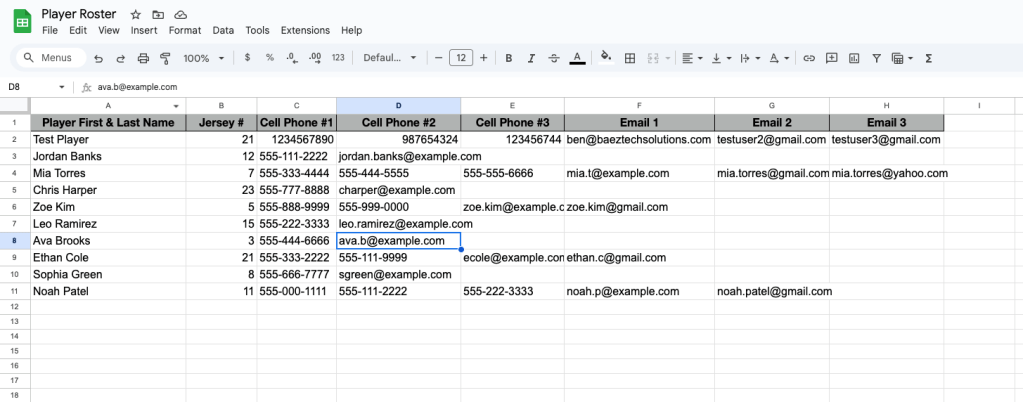
We began by structuring the player roster sheet with:
- Player name, jersey number
- Up to 3 phone numbers
- Up to 3 email addresses
Then, we created a Google Web App (see below 👇) with these features:
- A dropdown to select a player
- Instant display of all contact details
- Conditional UI to show email form only when needed
- Fully integrated Gmail API to send custom messages right from the browser
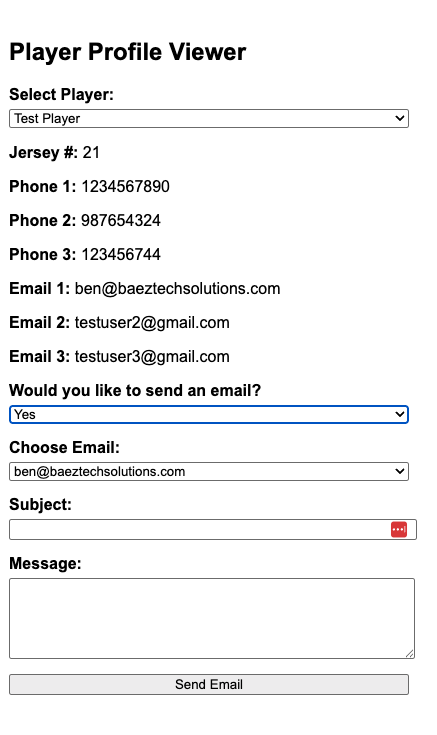
🖥️ Interface Preview
🚀 ROI / Impact
✅ Eliminated spreadsheet clutter and manual copy/paste emailing
✅ Coaches now send quick updates or announcements directly from the interface
✅ Zero learning curve – built for non-tech users
✅ Built entirely with free Google tools
🎥 Video Demo
Google Sheet Design
📌 Tech Stack
- Google Sheets
- Google Apps Script
- HTML / JS frontend (Web App UI)
- Gmail API (Apps Script built-in)


Leave a Reply