Summary:
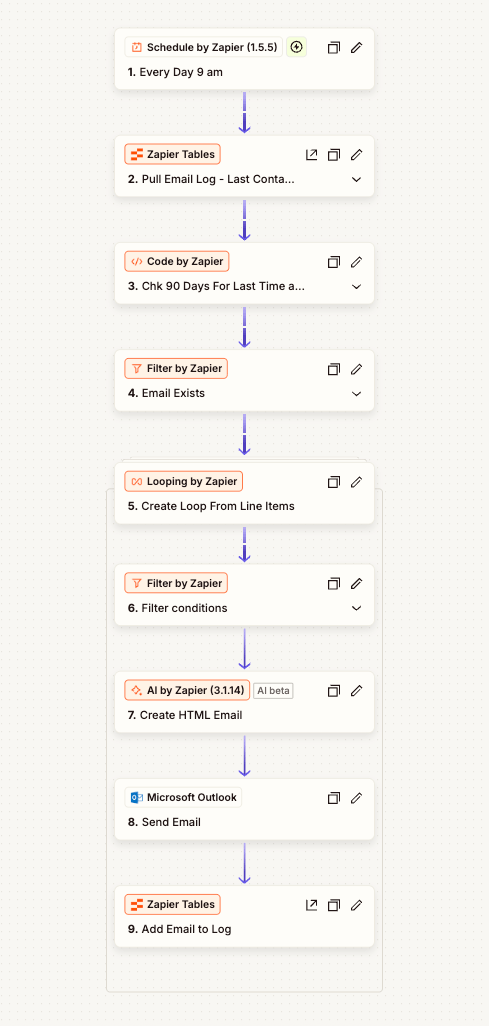
This automation helps our team consistently follow up with customers who haven’t placed an order in the last 90 days. Every morning at 9:00 AM, the workflow checks for eligible customers, generates a personalized HTML email, sends it via Outlook, and logs the send to a central record for tracking and compliance.
Project Overview
Manual follow-ups slip through the cracks, especially when a customer base is large and spread across multiple systems. I built a reliable, scheduled Zapier flow that identifies “inactive” customers (no orders in the last 90 days), crafts a friendly re-engagement email, sends it automatically, and records the outreach. The result: predictable touchpoints and measurable reactivation, without adding work to the team’s day.
Goals
- Detect customers who haven’t ordered in 90+ days
- Automatically email those customers with a personalized, on-brand message
- Log every send (who, when, template/version) for audits and performance tracking
- Keep logic simple, resilient, and maintainable (no-code + light code where helpful)
Workflow / Design
Daily schedule
- Schedule by Zapier – Triggers every day at 9:00 AM.
Gather & qualify recipients
2. Zapier Tables – Pull Email Log / Contacts – Retrieves customer records and last send/last order data.
3. Code by Zapier – Compares dates to confirm >= 90 days since last order (and since last outreach, if needed).
4. Filter by Zapier – Email Exists – Ensures we only proceed with valid/available email addresses.
5. Looping by Zapier – Iterates through the qualified customers (line-items) so each gets a dedicated message.
6. Filter by Zapier – Conditions – Optional business rules (e.g., skip unsubscribed, exclude VIP lists, etc.).
Create, send, and log
7. AI by Zapier (GPT) – Builds a short, personalized HTML email (greets the contact, references brand, includes CTA).
8. Microsoft Outlook – Send Email – Sends from the team mailbox for continuity and deliverability.
9. Zapier Tables – Add Email to Log – Stores the send record (email, timestamp, template, campaign tag) for reporting and deduping.
Data Model (example):
- Customers:
Name,LastOrderDate,Unsubscribed- Email_Log:
SentAt,CampaignName,TemplateVersion,Notes
Personalization & Content
- Tone: Friendly check-in (“We miss you!”), quick value reminder, single clear CTA (shop, schedule, or reply).
- Dynamic bits: First name, optional last purchased category, or a helpful resource link.
- Compliance: Includes physical address/signature line and unsubscribe instructions if your policy requires it.
Error Handling & Safeguards
- Filters prevent empty emails or unsubscribed contacts.
- Logging enables easy suppression (don’t email the same contact again within 90 days).
- Idempotency mindset: The table log is the source of truth to avoid duplicates.
ROI / Impact
- Time saved: Replaces manual list pulls and one-off emails (hours per week reclaimed).
- Consistency: Daily touchpoint—no more “we forgot this week.”
- Revenue lift: Even a small reactivation rate (2–5%) on dormant customers yields meaningful incremental orders.
- Visibility: Clear outreach history for support, sales, and leadership.
Tools Used
- Zapier (Schedule, Tables, Looping, Filters, Code, AI by Zapier)
- Microsoft Outlook (send + shared mailbox)
- Cin7 Omni
Implementation Snapshot
- Build Time: ~2–4 hours (including testing & logging structure)
- Maintenance: Low—update copy seasonally, review logs weekly
 BAEZ TECH SOLUTIONS
Leave a comment