Client Goal:
Simplify the onboarding process for new tax clients by automatically sending relevant tax documentation based on their appointment type in Calendly.
🛠️ The Challenge
Tax professionals often spend time manually identifying a client’s needs after an appointment is booked — then preparing and emailing the appropriate forms. This process was error-prone, slow, and inconsistent.
⚙️ The Automated Workflow
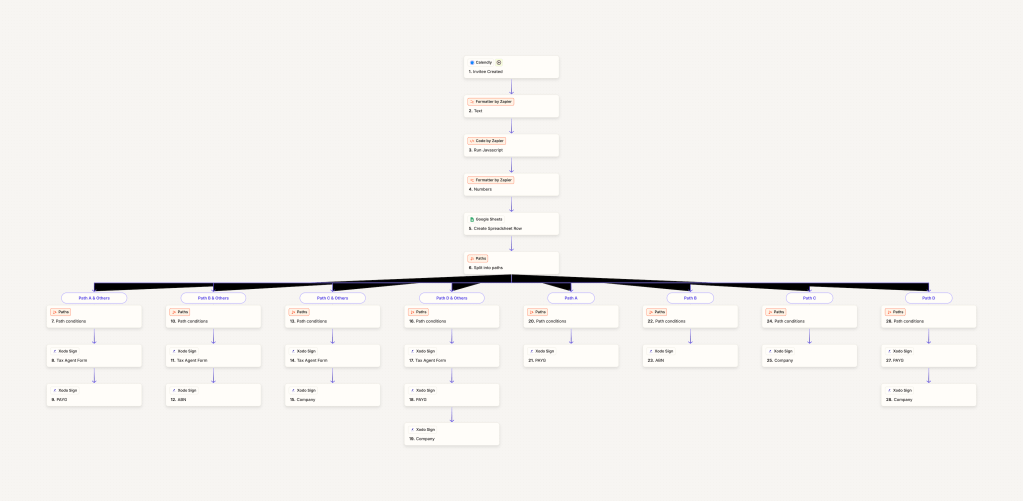
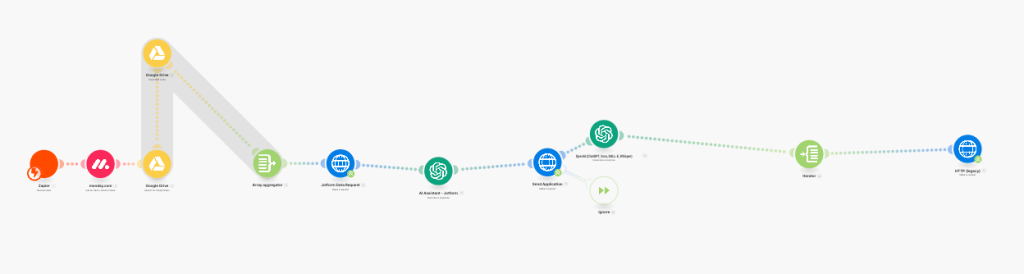
Using Zapier, we created an end-to-end automation that:
- Triggers on Calendly Invite Creation
- Uses Formatter and JavaScript by Zapier to parse appointment metadata.
- Sorts clients by tax category (PAYG, ABN, Company, or Tax Agent-only) using conditional Paths.
- Creates a row in Google Sheets for internal tracking and reporting.
- Delivers required documents via Xodo Sign, fully tailored to the client’s appointment type.
🔄 Document Logic Snapshot
Each conditional path uses custom logic to decide:
- If the client is PAYG, ABN, or a Company.
- If multiple documents are required (e.g., Tax Agent Form + Company Agreement).
- Which Xodo Sign documents to send in what order.
Example Path:
- Calendly Appointment ➝ PAYG Path ➝ Tax Agent Form + PAYG Form sent via Xodo Sign.
💡 Results & ROI
- Time Saved: Reduced manual email prep by ~10 minutes per client.
- Consistency: 100% correct document delivery rate based on appointment logic.
- Professionalism: Seamless, branded document experience via Xodo Sign.
- Scalability: New tax form types or appointment types can be added easily via Zapier Paths.
📌 Tools Used
- Zapier (Multi-Path Zaps)
- Calendly
- Xodo Sign
- Google Sheets
- JavaScript Formatter by Zapier
✅ Outcome
The client now enjoys a hands-free onboarding process, with smart routing of documents tailored to each client’s appointment type — improving operational efficiency and enhancing the customer experience.
 BAEZ TECH SOLUTIONS
Leave a comment