
Client Goal:
After clients complete their tax documents via Xodo Sign, send them a customized welcome email and checklist based on their tax category as well as collect payment — without lifting a finger.
🧩 The Problem
Once clients signed their documents, the business had to manually:
- Review the submission,
- Categorize the client (PAYG, ABN, or Tax Agent only),
- Send follow-up emails and onboarding resources.
This added hours of admin time each week and left room for error.
⚙️ The Automated Workflow
Once a document is signed in Xodo Sign, this automation takes over:
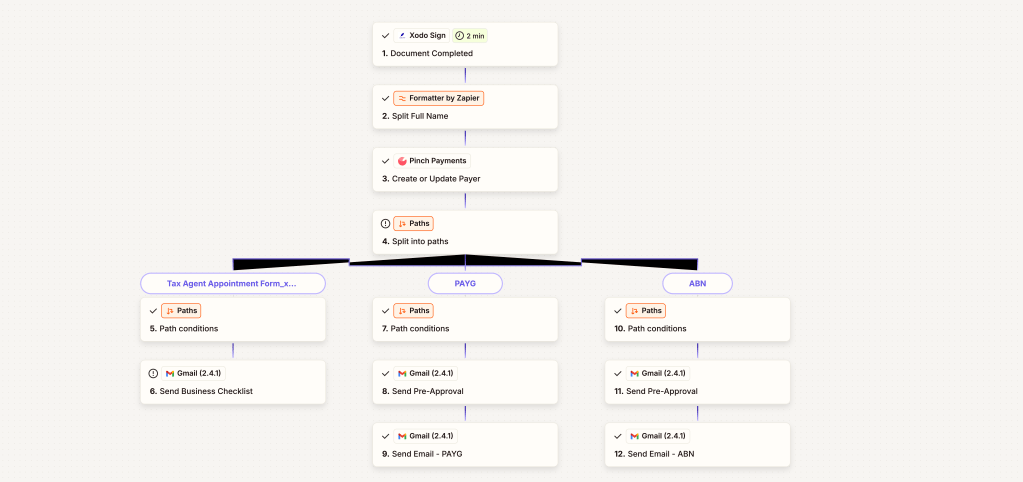
- Xodo Sign Trigger:
Detects the signed document event. - Formatter by Zapier:
Parses the client’s full name for personalized communication. - Pinch Payments:
Creates or updates the client record in their billing system. - Paths Branching:
Based on client type (Tax Agent, PAYG, or ABN), routes to the correct email sequence. - Gmail Integration:
Automatically sends:- A Business Checklist for Tax Agents,
- A Pre-Approval Email and PAYG-specific email, or
- A Pre-Approval Email and ABN-specific email.
🔄 Flow Snapshot
- Tax Agent: Checklist sent via Gmail.
- PAYG Clients: Pre-approval + PAYG guide.
- ABN Clients: Pre-approval + ABN-specific guidance.
💡 Key Results
- Admin Time Saved: 100+ hours annually.
- Consistency: Every client receives the correct, branded onboarding material.
- Client Experience: Improved trust and professionalism from immediate follow-up.
- Billing Alignment: Synced client data with Pinch Payments.
🧰 Tools Used
- Zapier Multi-Path Automation
- Xodo Sign
- Pinch Payments
- Gmail API
- Formatter by Zapier
✅ Outcome
This automation ensures that the moment a document is completed, the client is welcomed, informed, and ready to move forward — all without a single manual email.
 BAEZ TECH SOLUTIONS
Leave a comment