
🧩 Overall
To streamline the offboarding process and avoid inconsistencies, we automated a workflow that validates and deactivates Salesforce accounts only when they are confirmed as having a Salesforce account. These errors often triggered unnecessary manual investigation, even though the root cause was simply that the user never had a Salesforce account to begin with—resulting in wasted time and confusion over non-existent offboarding actions.
🎯 Goal
The primary goal was to eliminate false negatives when offboarding users from Salesforce.
🔄 Workflow / Design
Here’s how the automation works:
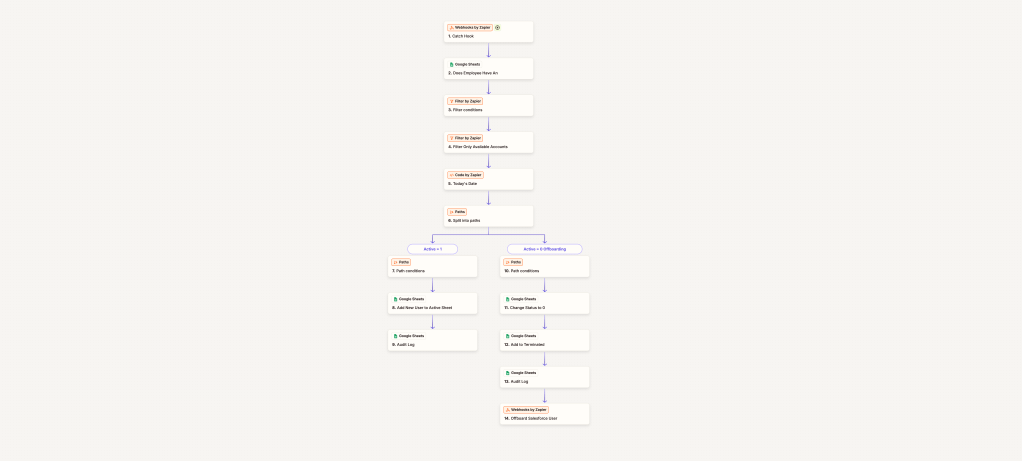
Trigger: Onelogin Suspends User
When a user is terminated, BetterCloud fires an API/webhook call to Zapier.
Verification: Check Google Sheet for Salesforce Users. Zapier cross-references a Google Sheet that lists all current Salesforce users. This sheet is synced every 4 hours directly from Salesforce to maintain real-time accuracy.
Filtering Logic: If the user is not found on the sheet, the process stops—no action taken (zero errors). If the user is found and their status is 1 (indicating they are active), we continue.
Execution: If found, we update the internal audit logs for traceability and send the deactivation call to Salesforce.
📈 Impact
This automation improved accuracy and accountability across our offboarding workflow by:
Catching Salesforce offboarding failures that that are false failures. Ensuring that only verified users with accounts in Salesforce deactivated. Reducing manual overhead and reliance on IT teams for user audits.
🔍 Why It Matters
By connecting BetterCloud, Google Sheets, and Salesforce through Zapier, we created a closed-loop offboarding process that enhances both security and reliability—without increasing complexity.
 BAEZ TECH SOLUTIONS
Leave a comment