Overall
To improve meeting documentation and team collaboration, we implemented an automation that sends finalized AI-generated summaries from Fathom directly into the appropriate agenda documents or project folders within Google Drive.
Goal
Our goal was to eliminate the manual step of copying summaries and ensure that meeting notes are always stored in the right place—alongside agendas or within project-specific folders. This keeps documentation centralized, accessible, and easy to reference.
Workflow / Design
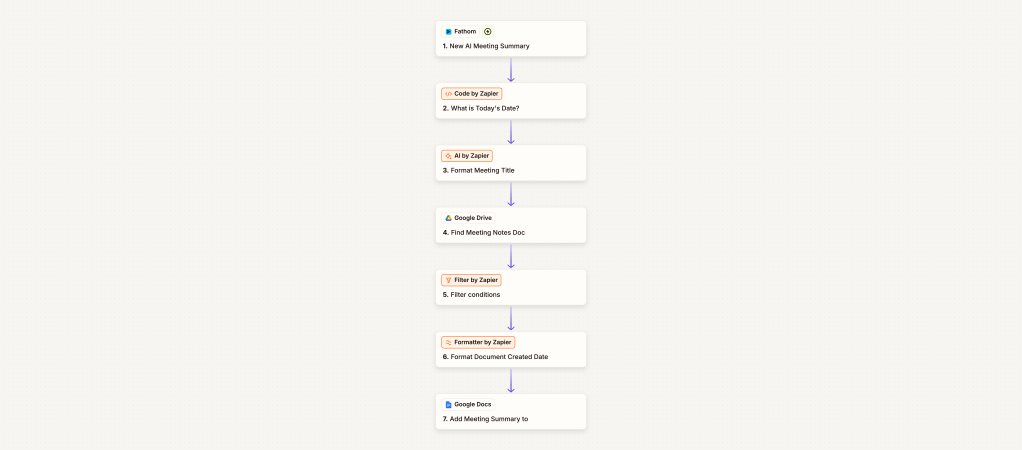
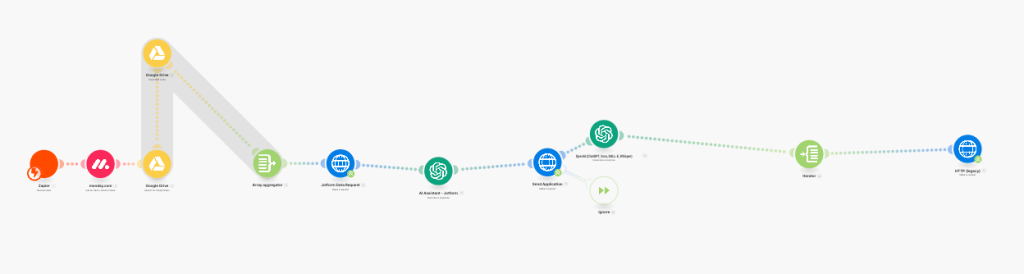
Once a meeting ends and Fathom finalizes the AI-generated summary, the automation kicks off via Zapier:
- 📅 Extract metadata from the meeting (title, date, participants).
- 🔍 Search Google Drive for the matching agenda document or project folder.
- 📄 Append the summary to the existing agenda or create a new doc in the designated folder.
- 🔔 Optionally, send a confirmation email or Slack notification to inform the team that the summary is filed.
Impact
This automation ensures:
- ✅ No more manual copy/paste tasks
- ✅ Meeting notes are always filed correctly
- ✅ Teams save time on admin work
- ✅ Better access to historical meeting records
- ✅ A more organized, searchable Drive workspace
With this setup, meeting history is now structured, consistent, and instantly accessible—no more lost notes or messy document folders.
 BAEZ TECH SOLUTIONS
Leave a comment