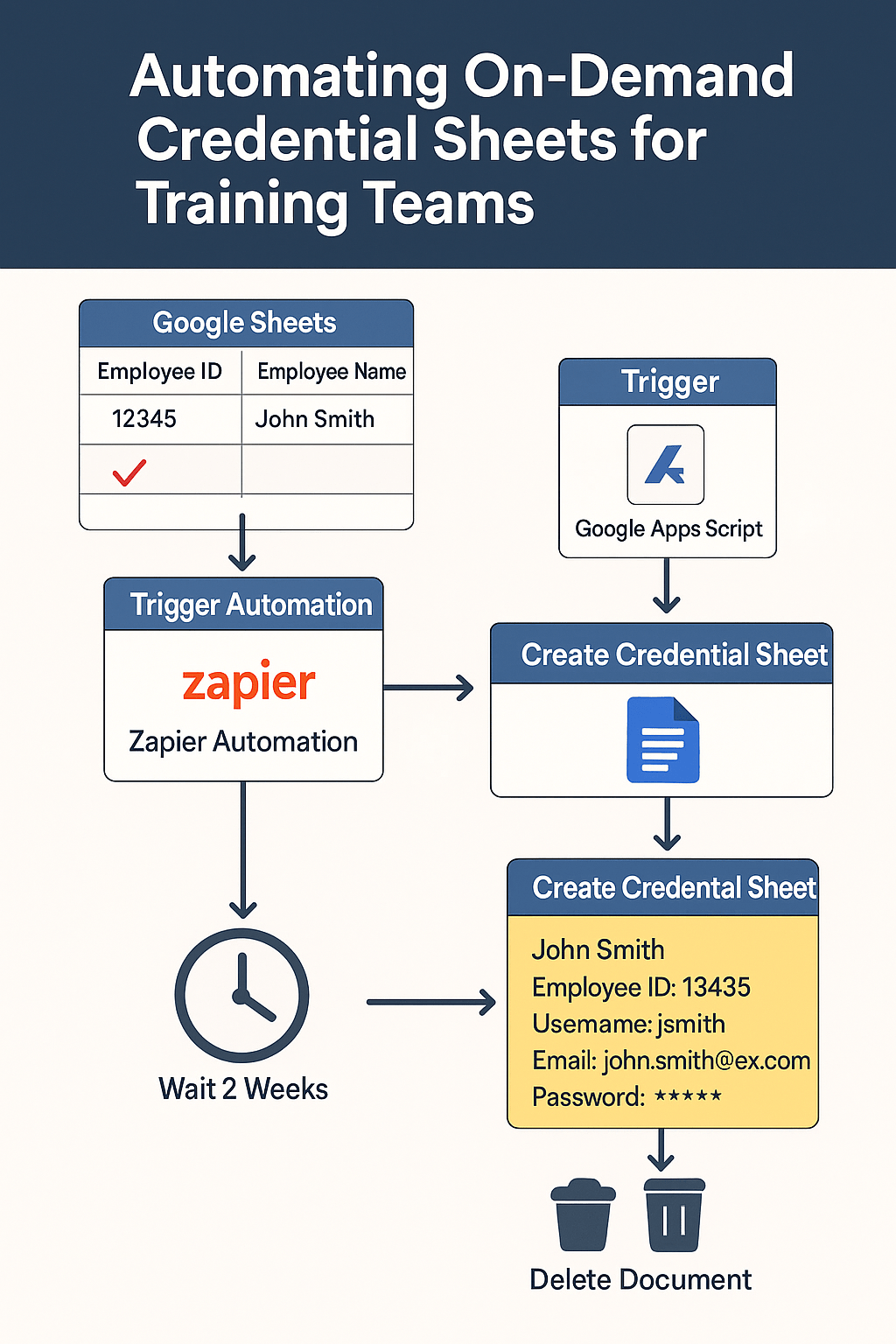
🧩 Overall
The Training Department needed a reliable and efficient way to generate employee credential sheets on an ad hoc basis. These documents needed to include key Onelogin account details and be automatically deleted after two weeks to maintain data security.
🎯 Goal
To empower non-technical staff to trigger a workflow that:
- Retrieves employee data from Onelogin
- Auto-generates a 1-page Google Doc
- Saves it in a specific Google Drive folder
- Automatically deletes the file after 2 weeks
—all by simply updating a Google Sheet.
🛠️ Workflow / Design
1. Trigger via Google Sheets
- Staff enter the Employee ID and Name
- Mark the row as “Send”
2. Google Apps Script → Zapier
- A script detects the “Send” flag
- It sends a Webhook POST request to Zapier
3. Zapier Automation Steps
- 🔑 Get Onelogin Token – Authenticates using API credentials
- 👤 Retrieve User Info – Filters user data based on Employee ID
- 📄 Create Google Doc – A new document is generated using a predefined template, mapping:
- Name
- Employee ID
- Username
- Passwords
- 🗂️ File Handling – The doc is saved in a designated Google Drive folder
- ⏳ Auto Deletion – A built-in delay in Zapier deletes the file after 14 days
🚀 Impact
✅ Zero Manual Work: The only manual task is entering data in a spreadsheet.
✅ Secure by Design: Documents are deleted after 2 weeks—no follow-up needed.
✅ Efficient Training: Onboarding workflows are simplified and standardized.
✅ Scalable Setup: This system can be reused by other departments with minor tweaks.
✨ Result:
A completely automated document generation pipeline that saves time, ensures consistency, and upholds data security—with no technical expertise required from the end user.

function onEdit(e) {
  if (!e) {
    Logger.log("Error: Event object is undefined. Please edit the sheet directly.");
    return;
  }

  const sheet = e.source.getActiveSheet();
  const range = e.range;

  // Check if the edited cell is in column D
  if (range.getColumn() === 4) {
    const row = range.getRow();
    const checkboxValue = range.getValue();

    // Proceed only if the checkbox is checked (true)
    if (checkboxValue === true) {
      const employeeId = sheet.getRange(row, 1).getValue(); // Column A
      const employeeName = sheet.getRange(row, 2).getValue(); // Column B

      // Prepare the JSON payload
      const payload = {
        employeeId: employeeId,
        employeeName: employeeName,
      };

      // Define the API endpoint
      const apiUrl = 'SOURCE_URL'; // Replace with your actual API URL

      // Options for the API call
      const options = {
        method: 'POST',
        contentType: 'application/json',
        payload: JSON.stringify(payload),
      };

      // Send the API request
      try {
        const response = UrlFetchApp.fetch(apiUrl, options);
        Logger.log('Response: ' + response.getContentText());
      } catch (error) {
        Logger.log('Error: ' + error.message);
      }
    }
  }
}
 BAEZ TECH SOLUTIONS
Leave a comment